Meadow.Foundation.Displays.St7789
| St7789 | |
|---|---|
| Status |  |
| Source code | GitHub |
| Datasheet(s) | GitHub |
| NuGet package |  |
The ST7789 is a display controller used to drive color displays over SPI using 12, 16 or 18 bbp. These displays require a backlight. These are typically paired with high pixel density displays, the most common being a 1.5" 240x240 display.
ST7789 displays typically use SPI mode 3, but you may find variants that require different modes.
The Meadow.Foundation ST7789 driver currently only supports 16bpp RGB565.
Purchasing
You can get ST7789 displays from the following suppliers:
Code Example
MicroGraphics graphics;
St7789 display;

public override Task Initialize()
{
    Resolver.Log.Info("Initializing ...");

    var spiBus = Device.CreateSpiBus();

    display = new St7789(
        spiBus: spiBus,
        chipSelectPin: Device.Pins.A03,
        dcPin: Device.Pins.A04,
        resetPin: Device.Pins.A05,
        width: 240, height: 240, colorMode: ColorMode.Format16bppRgb565);

    display.Clear(Color.AliceBlue);
    display.Show();

    graphics = new MicroGraphics(display)
    {
        Rotation = RotationType._90Degrees,
        IgnoreOutOfBoundsPixels = true
    };

    return base.Initialize();
}

public override Task Run()
{
    graphics.Clear(true);

    graphics.DrawRectangle(120, 0, 120, 220, Color.White, true);
    graphics.DrawRectangle(0, 0, 120, 20, Color.Red, true);
    graphics.DrawRectangle(0, 20, 120, 20, Color.Purple, true);
    graphics.DrawRectangle(0, 40, 120, 20, Color.Blue, true);
    graphics.DrawRectangle(0, 60, 120, 20, Color.Green, true);
    graphics.DrawRectangle(0, 80, 120, 20, Color.Yellow, true);
    graphics.DrawRectangle(0, 100, 120, 20, Color.Orange, true);

    graphics.Show();

    DisplayTest();

    return base.Run();
}
Sample project(s) available on GitHub
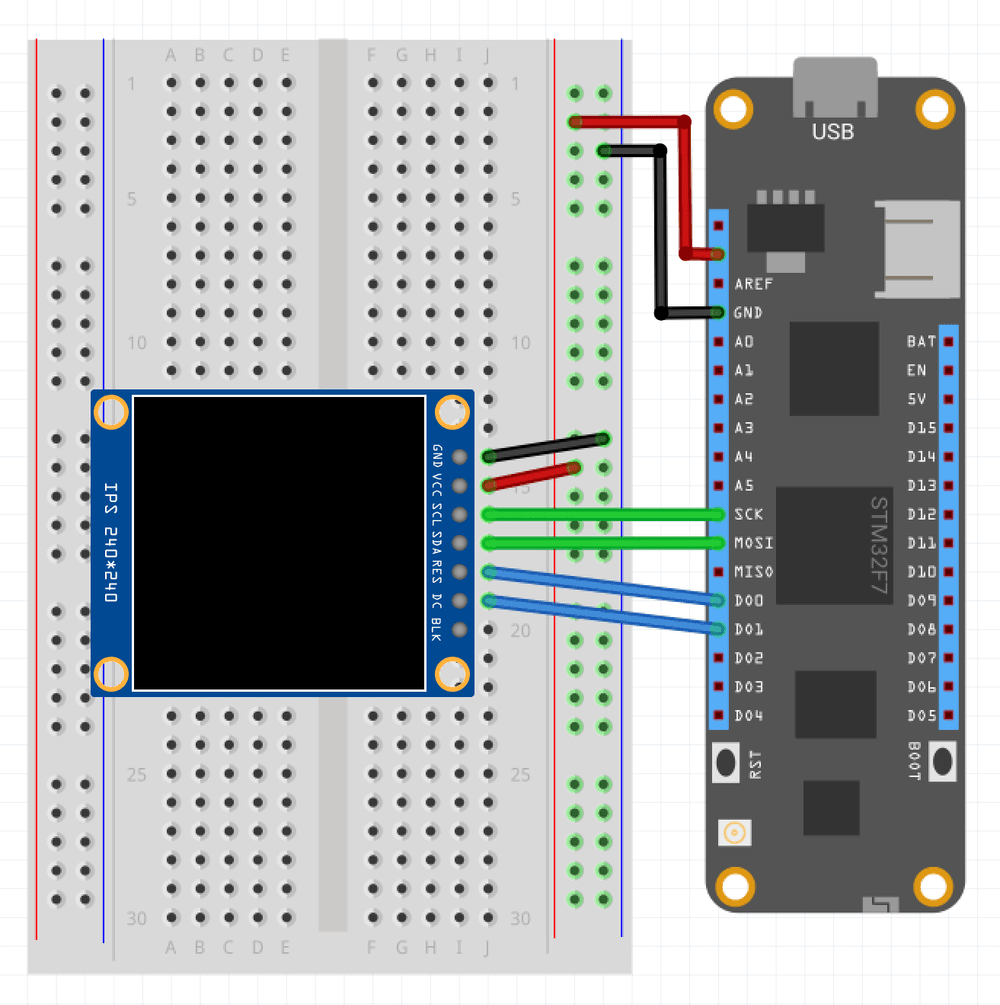
Wiring Example
To wire a ST7789 to your Meadow board, connect the following:
| ST7789 | Meadow Pin |
|---|---|
| GND | GND |
| VCC | 3V3 |
| SCL | SCK |
| SDA | MOSI |
| RESET | D00 |
| DC | D01 |
It should look like the following diagram: